


Create Images#
This section describes how to create new images from various mathematical models.
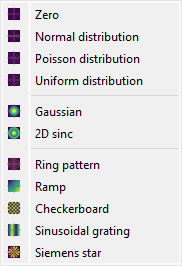
Screenshot of the “Create” menu.#
When the “Image Panel” is selected, the menus and toolbars are updated to provide image-related actions.
The “Create” menu allows you to create new images from various models (see below).
New image#
Create a new image from various models (supported datatypes: uint8, uint16, int16, float32, float64):
Icon |
Model |
Equation |
|---|---|---|

|
Zero |
\(z[i] = 0\) |

|
Normal distribution |
\(z[i]\) is normally distributed with configurable mean and standard deviation |

|
Poisson distribution |
\(z[i]\) is Poisson distributed with configurable mean |

|
Uniform distribution |
\(z[i]\) is uniformly distributed between two configurable bounds |

|
2D Gaussian |
\(z = A \cdot \exp\left(-\dfrac{\left(\sqrt{\left(x-x_0\right)^2+\left(y-y_0\right)^2}-\mu\right)^2}{2\sigma^2}\right)\) |

|
2D Ramp |
\(z = A (x - x_0) + B (y - y_0) + C\) |

|
Checkerboard |
Alternating square pattern for calibration and spatial frequency analysis |

|
Sinusoidal grating |
\(z = A \sin(2\pi(f_x \cdot x + f_y \cdot y) + \varphi) + C\) |

|
Ring pattern |
Concentric circular rings for radial analysis |

|
Siemens star |
Radial spoke pattern for resolution testing |

|
2D sinc |
\(z = A \cdot \mathrm{sinc}\left(\dfrac{\sqrt{(x-x_0)^2+(y-y_0)^2}}{\sigma}\right) + C\) |