


Contour Detection#
DataLab provides a “Contour Detection” feature which is based on the marching squares algorithm.
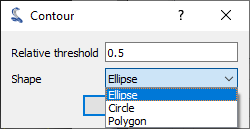
Contour detection parameters.#
- How to use the feature:
Create or open an image in DataLab workspace
Eventually create a ROI around the target area
Select “Contour detection” in “Analysis” menu
Enter parameters “Relative threshold” and “Shape” (“Ellipse”, “Circle” or “Polygon”)
Optionally, enable “Create regions of interest” to automatically create a ROI from each detected contour:
ROI geometry is determined by the selected shape: circular ROIs for circles, polygonal ROIs for polygons and ellipses (approximated by a polygon)
Created ROIs can be useful for subsequent processing on each contour area
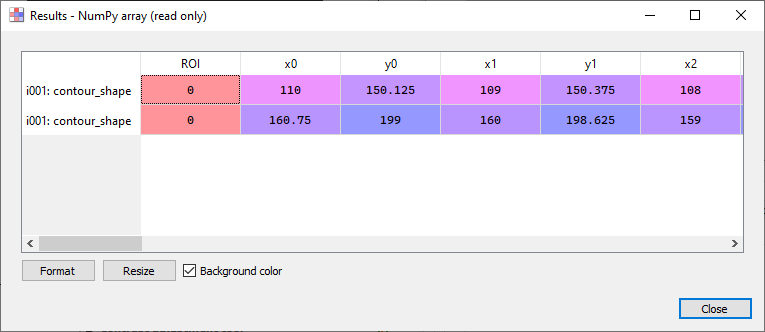
Contour detection results (see test “contour_app_test.py”)#
- Results are shown in a table:
Each row is associated to a contour, and is labelled with the name of the function and the reference of the image (followed by the ROI title, if a ROI is defined on input image)
Columns show contour coordinates: 3 columns for circles (center coordinates x, y and radius r), 5 columns for ellipses (center coordinates x, y, semi-axes a, b and angle θ), and vertex coordinates (x0, y0, x1, y1, …) for polygons
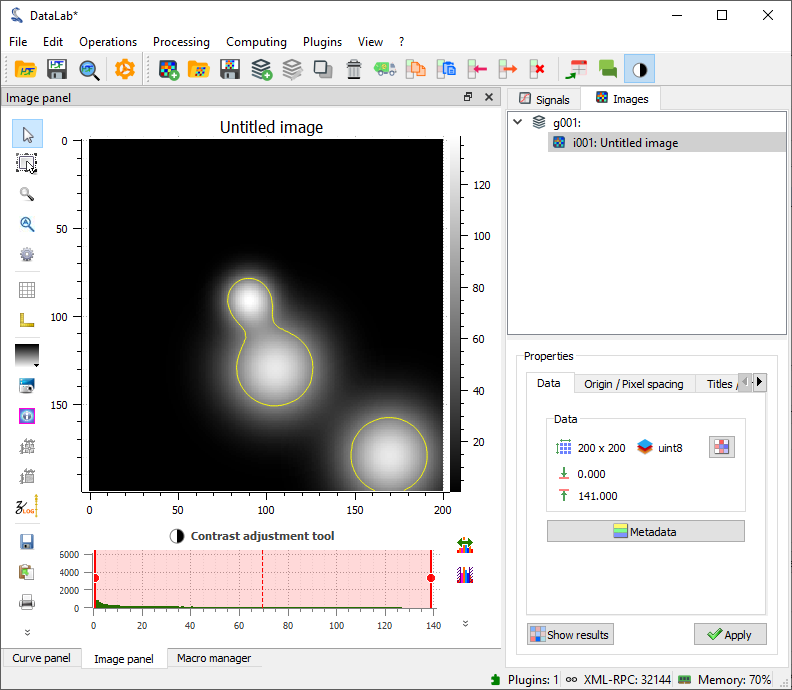
Example of contour detection.#
- The contour detection algorithm works in the following way:
First, iso-valued contours are computed (implementation based on skimage.measure.find_contours.find_contours)
Then, each contour is fitted to the closest ellipse (or circle)
Feature is based on get_contour_shapes function from sigima.tools module:
def get_contour_shapes(
    data: np.ndarray | ma.MaskedArray,
    shape: ContourShape = ContourShape.ELLIPSE,
    level: float = 0.5,
) -> np.ndarray:
    """Find iso-valued contours in a 2D array, above relative level (.5 means FWHM).

    Args:
        data: Input data
        shape: Shape to fit. Default is ELLIPSE
        level: Relative level (default: 0.5)

    Returns:
        Coordinates of shapes fitted to contours
    """
    # pylint: disable=too-many-locals
    contours = measure.find_contours(data, level=get_absolute_level(data, level))
    coords = []
    for contour in contours:
        # `contour` is a (N, 2) array (rows, cols): we need to check if all those
        # coordinates are masked: if so, we skip this contour
        if isinstance(data, ma.MaskedArray) and np.all(
            data.mask[contour[:, 0].astype(int), contour[:, 1].astype(int)]
        ):
            continue
        if shape == ContourShape.CIRCLE:
            result = fit_circle_model(contour)
            if result:
                xc, yc, r = result
                if r > 1.0:
                    coords.append([xc, yc, r])
        elif shape == ContourShape.ELLIPSE:
            result = fit_ellipse_model(contour)
            if result:
                xc, yc, a, b, theta = result
                if a > 1.0 and b > 1.0:
                    coords.append([xc, yc, a, b, theta])
        elif shape == ContourShape.POLYGON:
            # `contour` is a (N, 2) array (rows, cols): we need to convert it
            # to a list of x, y coordinates flattened in a single list
            coords.append(contour[:, ::-1].flatten())
        else:
            raise NotImplementedError(f"Invalid contour shape {shape}")
    if shape == ContourShape.POLYGON:
        # `coords` is a list of arrays of shape (N, 2) where N is the number of points
        # that can vary from one array to another, so we need to padd with NaNs each
        # array to get a regular array:
        max_len = max(coord.shape[0] for coord in coords)
        arr = np.full((len(coords), max_len), np.nan)
        for i_row, coord in enumerate(coords):
            arr[i_row, : coord.shape[0]] = coord
        return arr
    return np.array(coords)