


Remote controlling (XML-RPC)#
Note
For new projects, we recommend using the Web API instead of XML-RPC. The Web API provides better performance for large arrays, token-based authentication, and compatibility with browser environments (WASM/Pyodide).
XML-RPC remains available for backward compatibility with existing integrations.
DataLab may be controlled remotely using the XML-RPC protocol which is natively supported by Python (and many other languages). Remote controlling allows to access DataLab main features from a separate process.
Note
If you are looking for a lightweight alternative to remote control DataLab
(i.e. without installing the whole DataLab package and its dependencies in
your environment), use the sigima.client.SimpleRemoteProxy class
provided by the Sigima package (pip install sigima). It exposes the
same XML-RPC entry points as the RemoteProxy class described below, with
a minimal set of dependencies.
This class supersedes cdlclient.SimpleRemoteProxy: the cdlclient
package is deprecated and archived since DataLab 1.3. Its connection dialog
is now provided by SigimaX (see Connection dialog below).
From an IDE#
DataLab may be controlled remotely from an IDE (e.g. Spyder or any other
IDE, or even a Jupyter Notebook) that runs a Python script. It allows to
connect to a running DataLab instance, adds a signal and an image, and then
runs calculations. This feature is exposed by the RemoteProxy class that
is provided in module datalab.control.proxy.
From a third-party application#
DataLab may also be controlled remotely from a third-party application, for the same purpose.
If the third-party application is written in Python 3, it may directly use the RemoteProxy class as mentioned above. From another language, it is also achievable, but it requires to implement a XML-RPC client in this language using the same methods of proxy server as in the RemoteProxy class.
Data (signals and images) may also be exchanged between DataLab and the remote client application, in both directions.
The remote client application may be written in any language that supports XML-RPC. For example, it is possible to write a remote client application in Python, Java, C++, C#, etc. The remote client application may be a graphical application or a command line application.
The remote client application may be run on the same computer as DataLab or on a different computer. In the latter case, the remote client application must know the IP address of the computer running DataLab.
The remote client application may be run before or after DataLab. In the latter case, the remote client application must try to connect to DataLab until it succeeds.
Supported features#
Supported features are the following:
Switch to signal or image panel
Remove all signals and images
Save current session to a HDF5 file
Open HDF5 files into current session
Browse HDF5 file
Open a signal or an image from file
Add a signal
Add an image
Get object list
Run calculation with parameters
Note
The signal and image objects are described on this section: Internal data model.
Some examples are provided to help implementing such a communication between your application and DataLab:
See module:
datalab.tests.features.control.remoteclient_app_testSee module:
datalab.tests.features.control.remoteclient_unit
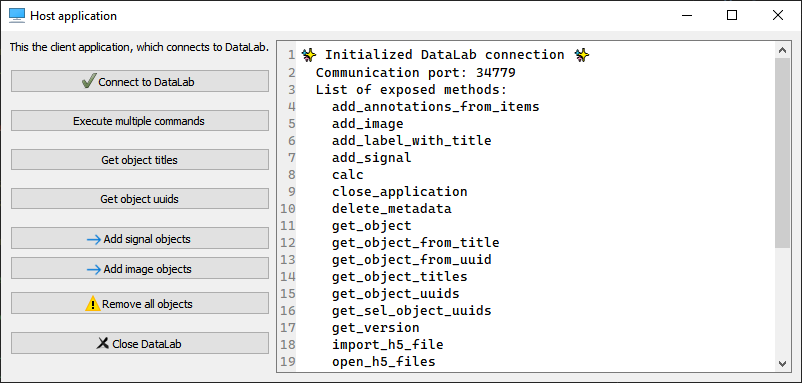
Screenshot of remote client application test (datalab.tests.features.control.remoteclient_app_test)#
Examples#
When using Python 3, you may directly use the RemoteProxy class as in examples cited above or below.
Here is an example in Python 3 of a script that connects to a running DataLab instance, adds a signal and an image, and then runs calculations (the cell structure of the script make it convenient to be used in Spyder IDE):
"""
Example of remote control of DataLab current session,
from a Python script running outside DataLab (e.g. in Spyder)

Created on Fri May 12 12:28:56 2023

@author: p.raybaut
"""

# %% Importing necessary modules

# NumPy for numerical array computations:
import numpy as np

# DataLab remote control client:
from sigima.client import SimpleRemoteProxy as RemoteProxy

# %% Connecting to DataLab current session

proxy = RemoteProxy()

# %% Executing commands in DataLab (...)

z = np.random.rand(20, 20)
proxy.add_image("toto", z)

# %% Executing commands in DataLab (...)

proxy.toggle_auto_refresh(False)  # Turning off auto-refresh
x = np.array([1.0, 2.0, 3.0])
y = np.array([4.0, 5.0, -1.0])
proxy.add_signal("toto", x, y)

# %% Executing commands in DataLab (...)

proxy.calc("derivative")
proxy.toggle_auto_refresh(True)  # Turning on auto-refresh

# %% Executing commands in DataLab (...)

proxy.set_current_panel("image")

# %% Executing a lot of commands without refreshing DataLab

z = np.random.rand(400, 400)
proxy.add_image("foobar", z)
with proxy.context_no_refresh():
    for _idx in range(100):
        proxy.calc("fft")
Here is a Python 2.7 reimplementation of this class:
# Copyright (c) DataLab Platform Developers, BSD 3-Clause license, see LICENSE file.

"""
DataLab remote controlling class for Python 2.7
"""

import io
import os
import os.path as osp
import socket
import sys

import ConfigParser as cp
import numpy as np
from guidata.userconfig import get_config_dir
from xmlrpclib import Binary, ServerProxy


def array_to_rpcbinary(data):
    """Convert NumPy array to XML-RPC Binary object, with shape and dtype"""
    dbytes = io.BytesIO()
    np.save(dbytes, data, allow_pickle=False)
    return Binary(dbytes.getvalue())


def get_datalab_xmlrpc_port():
    """Return DataLab current XML-RPC port"""
    if sys.platform == "win32" and "HOME" in os.environ:
        os.environ.pop("HOME")  # Avoid getting old WinPython settings dir
    fname = osp.join(get_config_dir(), ".DataLab", "DataLab.ini")
    ini = cp.ConfigParser()
    ini.read(fname)
    try:
        return ini.get("main", "rpc_server_port")
    except (cp.NoSectionError, cp.NoOptionError):
        raise ConnectionRefusedError("DataLab has not yet been executed")


class RemoteClient(object):
    """Object representing a proxy/client to DataLab XML-RPC server"""

    def __init__(self):
        self.port = None
        self.serverproxy = None

    def connect(self, port=None):
        """Connect to DataLab XML-RPC server"""
        if port is None:
            port = get_datalab_xmlrpc_port()
        self.port = port
        url = "http://127.0.0.1:" + port
        self.serverproxy = ServerProxy(url, allow_none=True)
        try:
            self.get_version()
        except socket.error:
            raise ConnectionRefusedError("DataLab is currently not running")

    def get_version(self):
        """Return DataLab public version"""
        return self.serverproxy.get_version()

    def close_application(self):
        """Close DataLab application"""
        self.serverproxy.close_application()

    def raise_window(self):
        """Raise DataLab window"""
        self.serverproxy.raise_window()

    def get_current_panel(self):
        """Return current panel"""
        return self.serverproxy.get_current_panel()

    def set_current_panel(self, panel):
        """Switch to panel"""
        self.serverproxy.set_current_panel(panel)

    def reset_all(self):
        """Reset all application data"""
        self.serverproxy.reset_all()

    def toggle_auto_refresh(self, state):
        """Toggle auto refresh state"""
        self.serverproxy.toggle_auto_refresh(state)

    def toggle_show_titles(self, state):
        """Toggle show titles state"""
        self.serverproxy.toggle_show_titles(state)

    def save_to_h5_file(self, filename):
        """Save to a DataLab HDF5 file"""
        self.serverproxy.save_to_h5_file(filename)

    def open_h5_files(self, h5files, import_all, reset_all):
        """Open a DataLab HDF5 file or import from any other HDF5 file"""
        self.serverproxy.open_h5_files(h5files, import_all, reset_all)

    def import_h5_file(self, filename, reset_all):
        """Open DataLab HDF5 browser to Import HDF5 file"""
        self.serverproxy.import_h5_file(filename, reset_all)

    def load_from_files(self, filenames):
        """Open objects from files in current panel (signals/images)"""
        self.serverproxy.load_from_files(filenames)

    def add_signal(
        self,
        title,
        xdata,
        ydata,
        xunit=None,
        yunit=None,
        xlabel=None,
        ylabel=None,
        group_id="",
        set_current=True,
    ):
        """Add signal data to DataLab"""
        xbinary = array_to_rpcbinary(xdata)
        ybinary = array_to_rpcbinary(ydata)
        p = self.serverproxy
        return p.add_signal(
            title, xbinary, ybinary, xunit, yunit, xlabel, ylabel, group_id, set_current
        )

    def add_image(
        self,
        title,
        data,
        xunit=None,
        yunit=None,
        zunit=None,
        xlabel=None,
        ylabel=None,
        zlabel=None,
        group_id="",
        set_current=True,
    ):
        """Add image data to DataLab"""
        zbinary = array_to_rpcbinary(data)
        p = self.serverproxy
        return p.add_image(
            title,
            zbinary,
            xunit,
            yunit,
            zunit,
            xlabel,
            ylabel,
            zlabel,
            group_id,
            set_current,
        )

    def get_object_titles(self, panel=None):
        """Get object (signal/image) list for current panel"""
        return self.serverproxy.get_object_titles(panel)

    def get_object(self, nb_id_title=None, panel=None):
        """Get object (signal/image) by number, id or title"""
        return self.serverproxy.get_object(nb_id_title, panel)

    def get_object_uuids(self, panel=None, group=None):
        """Get object (signal/image) list for current panel"""
        return self.serverproxy.get_object_uuids(panel, group)


def test_remote_client():
    """DataLab Remote Client test"""
    datalab = RemoteClient()
    datalab.connect()
    data = np.array([[3, 4, 5], [7, 8, 0]], dtype=np.uint16)
    datalab.add_image("toto", data)


if __name__ == "__main__":
    test_remote_client()
Connection dialog#
A connection dialog may be used to connect to a running DataLab instance.
It is exposed by the sigimax.widgets.connection.ConnectionDialog
class, and takes optional icon and banner arguments to carry the
branding of the client application. It works with any proxy exposing a
blocking connect() method, i.e. both RemoteProxy and
sigima.client.SimpleRemoteProxy.
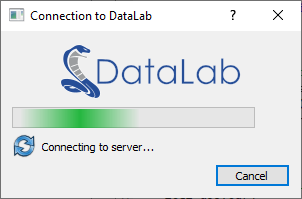
Screenshot of connection dialog (sigimax.widgets.connection.ConnectionDialog)#
Example of use:
# Copyright (c) DataLab Platform Developers, BSD 3-Clause license, see LICENSE file.

"""
DataLab Remote client connection dialog example
"""

# guitest: show,skip

from guidata.configtools import get_icon, get_image_file_path
from guidata.qthelpers import qt_app_context
from qtpy import QtGui as QG
from qtpy import QtWidgets as QW
from sigimax.widgets.connection import ConnectionDialog

from datalab.control.proxy import RemoteProxy


def test_dialog():
    """Test connection dialog"""
    proxy = RemoteProxy(autoconnect=False)
    with qt_app_context():
        dlg = ConnectionDialog(
            proxy.connect,
            icon=get_icon("DataLab.svg"),
            banner=QG.QPixmap(get_image_file_path("DataLab-Banner-200.png")),
        )
        if dlg.exec():
            QW.QMessageBox.information(None, "Connection", "Successfully connected")
        else:
            QW.QMessageBox.critical(None, "Connection", "Connection failed")


if __name__ == "__main__":
    test_dialog()
Public API#
- class datalab.control.remote.RemoteClient[source]#
Object representing a proxy/client to DataLab XML-RPC server. This object is used to call DataLab functions from a Python script.
Examples
Here is a simple example of how to use RemoteClient in a Python script or in a Jupyter notebook:
>>> from datalab.remote import RemoteClient
>>> proxy = RemoteClient()
>>> proxy.connect()
Connecting to DataLab XML-RPC server...OK (port: 28867)
>>> proxy.get_version()
'1.0.0'
>>> proxy.add_signal("toto", np.array([1., 2., 3.]), np.array([4., 5., -1.]))
True
>>> proxy.get_object_titles()
['toto']
>>> proxy["toto"]
<sigima.objects.signal.SignalObj at 0x7f7f1c0b4a90>
>>> proxy[1]
<sigima.objects.signal.SignalObj at 0x7f7f1c0b4a90>
>>> proxy[1].data
array([1., 2., 3.])
- set_port(port: str | None = None) None[source]#
Set XML-RPC port to connect to.
- Parameters:
port – XML-RPC port to connect to. If None, the port is automatically retrieved from DataLab configuration.
- connect(port: str | None = None, timeout: float | None = None, retries: int | None = None) None[source]#
Try to connect to DataLab XML-RPC server.
- Parameters:
port – XML-RPC port to connect to. If not specified, the port is automatically retrieved from DataLab configuration.
timeout – Maximum time to wait for connection in seconds. Defaults to 5.0. This is the total maximum wait time, not per retry.
retries – Number of retries. Defaults to 10. This parameter is deprecated and will be removed in a future version (kept for backward compatibility).
- Raises:
ConnectionRefusedError – Unable to connect to DataLab
ValueError – Invalid timeout (must be >= 0.0)
ValueError – Invalid number of retries (must be >= 1)
- add_signal(title: str, xdata: ndarray, ydata: ndarray, xunit: str = '', yunit: str = '', xlabel: str = '', ylabel: str = '', group_id: str = '', set_current: bool = True) bool[source]#
Add signal data to DataLab.
- Parameters:
title – Signal title
xdata – X data
ydata – Y data
xunit – X unit. Defaults to “”
yunit – Y unit. Defaults to “”
xlabel – X label. Defaults to “”
ylabel – Y label. Defaults to “”
group_id – group id in which to add the signal. Defaults to “”
set_current – if True, set the added signal as current
- Returns:
True if signal was added successfully, False otherwise
- Raises:
ValueError – Invalid xdata dtype
ValueError – Invalid ydata dtype
- add_image(title: str, data: ndarray, xunit: str = '', yunit: str = '', zunit: str = '', xlabel: str = '', ylabel: str = '', zlabel: str = '', group_id: str = '', set_current: bool = True) bool[source]#
Add image data to DataLab.
- Parameters:
title – Image title
data – Image data
xunit – X unit. Defaults to “”
yunit – Y unit. Defaults to “”
zunit – Z unit. Defaults to “”
xlabel – X label. Defaults to “”
ylabel – Y label. Defaults to “”
zlabel – Z label. Defaults to “”
group_id – group id in which to add the image. Defaults to “”
set_current – if True, set the added image as current
- Returns:
True if image was added successfully, False otherwise
- Raises:
ValueError – Invalid data dtype
- add_object(obj: SignalObj | ImageObj, group_id: str = '', set_current: bool = True) None[source]#
Add object to DataLab.
- Parameters:
obj – Signal or image object
group_id – group id in which to add the object. Defaults to “”
set_current – if True, set the added object as current
- set_object(obj: SignalObj | ImageObj) None[source]#
Set object data in DataLab.
Update an existing object in DataLab with new data from
obj. The object is identified by its UUID (which is carried byobjfrom a previousget_object()call).- Parameters:
obj – Signal or image object (must have the same UUID as an existing object in DataLab)
- Raises:
KeyError – if no object with matching UUID is found
- calc(name: str, param: DataSet | None = None) None[source]#
Call computation feature
nameNote
This calls either the processor’s
compute_<name>method (if it exists), or the processor’s<name>computation feature (if it is registered, using therun_featuremethod). It looks for the function in all panels, starting with the current one.- Parameters:
name – Compute function name
param – Compute function parameter. Defaults to None.
- Raises:
ValueError – unknown function
- get_object(nb_id_title: int | str | None = None, panel: str | None = None) SignalObj | ImageObj[source]#
Get object (signal/image) from index.
- Parameters:
nb_id_title – Object number, or object id, or object title. Defaults to None (current object).
panel – Panel name. Defaults to None (current panel).
- Returns:
Object
- Raises:
KeyError – if object not found
- get_object_shapes(nb_id_title: int | str | None = None, panel: str | None = None) list[source]#
Get plot item shapes associated to object (signal/image).
- Parameters:
nb_id_title – Object number, or object id, or object title. Defaults to None (current object).
panel – Panel name. Defaults to None (current panel).
- Returns:
List of plot item shapes
- add_annotations_from_items(items: list, refresh_plot: bool = True, panel: str | None = None) None[source]#
Add object annotations (annotation plot items).
- Parameters:
items – annotation plot items
refresh_plot – refresh plot. Defaults to True.
panel – panel name (valid values: “signal”, “image”). If None, current panel is used.
- call_method(method_name: str, *args, panel: str | None = None, **kwargs)[source]#
Call a public method on a panel or main window.
Method resolution order when panel is None: 1. Try main window (DLMainWindow) 2. If not found, try current panel (BaseDataPanel)
- Parameters:
method_name – Name of the method to call
*args – Positional arguments to pass to the method
panel – Panel name (“signal”, “image”, or None for auto-detection). Defaults to None.
**kwargs – Keyword arguments to pass to the method
- Returns:
The return value of the called method
- Raises:
AttributeError – If the method does not exist or is not public
ValueError – If the panel name is invalid
- start_webapi_server(host: str = '127.0.0.1', port: int = 8080) dict[str, str | int][source]#
Start the WebAPI server.
- Parameters:
host – Host address to bind to. Defaults to “127.0.0.1”.
port – Port number. Defaults to 8080.
- Returns:
Dictionary with server info including ‘url’ and ‘token’.
- stop_webapi_server() bool[source]#
Stop the WebAPI server.
- Returns:
True if server was stopped, False if it wasn’t running.
- get_webapi_status() dict[str, str | int | bool][source]#
Get the current status of the WebAPI server.
- Returns:
Dictionary with status info including ‘running’, ‘url’, and ‘port’.
- add_group(title: str, panel: str | None = None, select: bool = False) None#
Add group to DataLab.
- Parameters:
title – Group title
panel – Panel name (valid values: “signal”, “image”). Defaults to None.
select – Select the group after creation. Defaults to False.
- add_label_with_title(title: str | None = None, panel: str | None = None) None#
Add a label with object title on the associated plot
- Parameters:
title – Label title. Defaults to None. If None, the title is the object title.
panel – panel name (valid values: “signal”, “image”). If None, current panel is used.
- context_no_refresh() Generator[None, None, None]#
Return a context manager to temporarily disable auto refresh.
- Returns:
Context manager
Example
>>> with proxy.context_no_refresh():
...     proxy.add_image("image1", data1)
...     proxy.calc("fft")
...     proxy.calc("wiener")
...     proxy.calc("ifft")
...     # Auto refresh is disabled during the above operations
- delete_metadata(refresh_plot: bool = True, keep_roi: bool = False) None#
Delete metadata of selected objects
- Parameters:
refresh_plot – Refresh plot. Defaults to True.
keep_roi – Keep ROI. Defaults to False.
- get_current_object_uuid() str | None#
Return current object uuid in current panel.
- Returns:
UUID of the current object, or None if no object is current.
- get_current_panel() str#
Return current panel name.
- Returns:
“signal”, “image”, “macro”))
- Return type:
Panel name (valid values
- get_group_titles_with_object_info() tuple[list[str], list[list[str]], list[list[str]]]#
Return groups titles and lists of inner objects uuids and titles.
- Returns:
groups titles, lists of inner objects uuids and titles
- Return type:
Tuple
- get_object_titles(panel: str | None = None) list[str]#
Get object (signal/image) list for current panel. Objects are sorted by group number and object index in group.
- Parameters:
panel – panel name (valid values: “signal”, “image”, “macro”). If None, current data panel is used (i.e. signal or image panel).
- Returns:
List of object titles
- Raises:
ValueError – if panel not found
- get_object_uuids(panel: str | None = None, group: int | str | None = None) list[str]#
Get object (signal/image) uuid list for current panel. Objects are sorted by group number and object index in group.
- Parameters:
panel – panel name (valid values: “signal”, “image”). If None, current panel is used.
group – Group number, or group id, or group title. Defaults to None (all groups).
- Returns:
List of object uuids
- Raises:
ValueError – if panel not found
- classmethod get_public_methods() list[str]#
Return all public methods of the class, except itself.
- Returns:
List of public methods
- get_sel_object_uuids(include_groups: bool = False) list[str]#
Return selected objects uuids.
- Parameters:
include_groups – If True, also return objects from selected groups.
- Returns:
List of selected objects uuids.
- import_h5_file(filename: str, reset_all: bool | None = None) None#
Open DataLab HDF5 browser to Import HDF5 file.
- Parameters:
filename – HDF5 file name
reset_all – Reset all application data. Defaults to None.
- load_from_directory(path: str) None#
Open objects from directory in current panel (signals/images).
- Parameters:
path – directory path
- load_from_files(filenames: list[str]) None#
Open objects from files in current panel (signals/images).
- Parameters:
filenames – list of file names
- load_h5_workspace(h5files: list[str], reset_all: bool = False) None#
Load native DataLab HDF5 workspace files without any GUI elements.
This method can be safely called from scripts (e.g., internal console, macros) as it does not create any Qt widgets, dialogs, or progress bars.
Warning
This method only supports native DataLab HDF5 files. For importing arbitrary HDF5 files (non-native), use
open_h5_files()orimport_h5_file()instead.- Parameters:
h5files – List of native DataLab HDF5 filenames
reset_all – Reset all application data before importing. Defaults to False.
- Raises:
ValueError – If a file is not a valid native DataLab HDF5 file
- open_h5_files(h5files: list[str] | None = None, import_all: bool | None = None, reset_all: bool | None = None) None#
Open a DataLab HDF5 file or import from any other HDF5 file.
- Parameters:
h5files – List of HDF5 files to open. Defaults to None.
import_all – Import all objects from HDF5 files. Defaults to None.
reset_all – Reset all application data. Defaults to None.
- remove_object(force: bool = False) None#
Remove current object from current panel.
- Parameters:
force – if True, remove object without confirmation. Defaults to False.
- run_macro(number_or_title: int | str | None = None) None#
Run macro.
- Parameters:
number_or_title – Macro number, or macro title. Defaults to None (current macro).
- Raises:
ValueError – if macro not found
- save_h5_workspace(filename: str) None#
Save current workspace to a native DataLab HDF5 file without GUI elements.
This method can be safely called from scripts (e.g., internal console, macros) as it does not create any Qt widgets, dialogs, or progress bars.
- Parameters:
filename – HDF5 filename to save to
- Raises:
IOError – If file cannot be saved
- save_to_h5_file(filename: str) None#
Save to a DataLab HDF5 file.
- Parameters:
filename – HDF5 file name
- select_groups(selection: list[int | str] | None = None, panel: str | None = None) None#
Select groups in current panel.
- Parameters:
selection – List of group numbers (1 to N), or list of group uuids, or None to select all groups. Defaults to None.
panel – panel name (valid values: “signal”, “image”). If None, current panel is used. Defaults to None.
- select_objects(selection: list[int | str], panel: str | None = None) None#
Select objects in current panel.
- Parameters:
selection – List of object numbers (1 to N) or uuids to select
panel – panel name (valid values: “signal”, “image”). If None, current panel is used. Defaults to None.
- set_current_panel(panel: str) None#
Switch to panel.
- Parameters:
panel – Panel name (valid values: “signal”, “image”, “macro”))
- stop_macro(number_or_title: int | str | None = None) None#
Stop macro.
- Parameters:
number_or_title – Macro number, or macro title. Defaults to None (current macro).
- Raises:
ValueError – if macro not found