


The DataLab Platform#
When DataLab started in 2023, it was a single product: a desktop application. Since then, the same scientific core has grown into a small family of complementary tools — the DataLab Platform. This page clarifies the terminology and helps you choose the edition that best fits your needs.
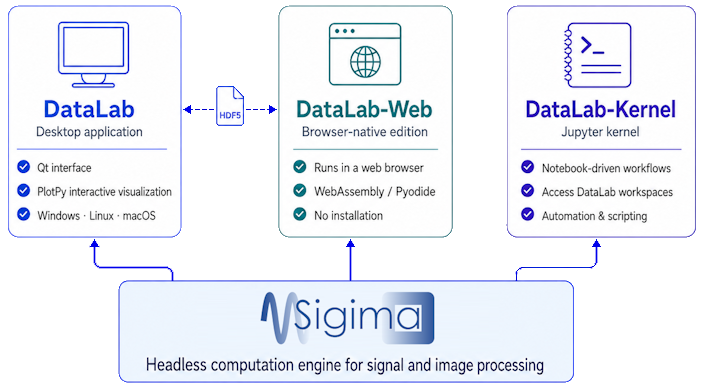
The DataLab Platform: the desktop application, DataLab-Web and DataLab-Kernel are three access modes sharing the same Sigima computation engine and interoperable through HDF5 workspaces.#
See also
The story behind this evolution — the extraction of the Sigima computation engine and the browser-native edition — is documented in the project reports and Architecture Decision Records published on the DataLab wiki.
A note on terminology#
The word DataLab is used both for the whole family and for its historical member, the desktop application. To avoid confusion, this documentation uses the following vocabulary:
Name |
Meaning |
|---|---|
DataLab Platform |
The umbrella term for the whole ecosystem (all the products listed below). |
DataLab |
The reference desktop application (Qt-based). Unless stated otherwise, the rest of this documentation describes this product. |
DataLab-Web |
The browser-native edition: the full platform running inside a web browser tab, with no installation. Try it at datalab-platform.com/web – project on GitHub. |
DataLab-Kernel |
A Jupyter kernel exposing DataLab workspaces to notebooks — either live-synchronized with a running desktop session, or fully standalone (including in JupyterLite, in the browser). Documentation. |
Sigima |
The headless computation engine (signal and image processing) shared by all of the above. Documentation. |
SigimaX |
The Qt application framework on which the desktop application is built: generic main window, configuration system, dockable plot widgets, HDF5 workspace and browser, log viewer and scientific dialogs. Aimed at developers building their own Qt scientific application. Documentation. |
Note
This documentation site is, first and foremost, the documentation of the desktop application. Everything that is shared across editions — the object model, the processing catalog, the parameters — is described here and applies to DataLab-Web as well. Only the differences specific to an edition are called out explicitly.
Members of the platform#
The reference application, with a native Qt graphical user interface and the full PlotPyStack interactive visualization. Runs locally on Windows, Linux and macOS.
The same platform, running entirely inside your browser via WebAssembly. Zero install, your data never leaves your machine. Try it at datalab-platform.com/web or browse the project on GitHub.
A Jupyter kernel for notebook-driven workflows: live-synchronized with a running desktop session, or fully standalone — notebooks run unchanged with or without DataLab, including in JupyterLite. See the DataLab-Kernel documentation.
The open-source computation engine that powers every edition. See the Sigima documentation.
The Qt application framework extracted from DataLab: main window skeleton, configuration system, plot docks, HDF5 workspace and scientific dialogs — the foundation of the desktop application, reusable for your own Qt application. See the SigimaX documentation.
Which one should I use?#
The desktop application and DataLab-Web are not competitors: they are two access modes to the same platform, and they can be used interchangeably (HDF5 workspaces are interoperable). A few rules of thumb:
Use the desktop application when you work on your own machine and want the richest, fastest experience, the full set of interactive PlotPy tools, native file access, and the ability to handle very large datasets limited only by your system RAM.
Use DataLab-Web when you cannot or do not want to install anything — for example on a shared or locked-down computer, on someone else’s machine, or simply to give DataLab a quick try. Everything runs locally in the browser tab; no server, no account, no upload.
Use DataLab-Kernel when your workflow is notebook-centric and you want DataLab’s processing catalog available from a Jupyter notebook — for example to write reproducible analysis reports that can be replayed with or without DataLab. You can try it online in a live JupyterLite environment, without installing anything.
A common pattern is to use the desktop application on your personal workstation and DataLab-Web everywhere else, sharing work back and forth through HDF5 workspace files.
DataLab vs DataLab-Web#
DataLab-Web shares the computation engine (Sigima) and the processing catalog with the desktop application: the very same Sigima code — not a port — runs on CPython (desktop) and on Pyodide (browser), so results are identical for the same inputs. The differences are about the runtime environment, not about the science.
Topic |
DataLab (desktop) |
DataLab-Web |
|---|---|---|
Installation |
Installed locally (Windows, Linux, macOS) |
None — runs in the browser |
Python runtime |
System CPython |
Pyodide (CPython compiled to WebAssembly) |
Graphical interface |
Qt + PlotPy |
React + Plotly.js |
Plotting |
PlotPy (Qt), full interactive tools |
Plotly.js (interactive tools partially reimplemented) |
File access |
Native file system I/O |
Browser file picker, drag-and-drop |
Persistence |
HDF5 on disk |
HDF5 download / upload (workspaces are interoperable) |
Memory |
Limited by system RAM (64-bit) |
~2 GB WebAssembly heap by default; an optional on-disk storage mode lifts this limit entirely, bounding the working set by available disk space instead of RAM |
Responsiveness |
Computations run in separate worker processes; the interface stays responsive and processings can be cancelled |
The Python runtime lives in a Web Worker, off the interface thread; the interface stays responsive and batch processings can be cancelled at object boundaries |
Languages |
English and French |
English and French (browser language detected automatically) |
Remote control |
XML-RPC and FastAPI Web API |
In-browser proxy and optional |
What is not different: the object model (SignalObj, ImageObj, ROIs, groups), the
processing catalog discovered from Sigima, the auto-generated parameter dialogs, and the
HDF5 workspace format. A workspace saved in the desktop application can be opened in
DataLab-Web, and vice versa.
Note
Plugins are largely portable between the desktop application and DataLab-Web, with a few constraints related to the browser runtime. See Plugins for details.